Enrich descriptors with dynamic data
This guide shows you how to enable and configure Descriptor Enrichment Providers in Witboost. Descriptor Enrichment Providers add live platform state to project descriptors at evaluation time, enabling governance policies to make decisions based on current conditions.
Enabling a provider introduces new fields into the descriptor that is passed to governance policies and Tech Adapters. Before activating it in a production environment, read the rollout guide to verify that your Tech Adapters and governance policies are ready to handle the enriched descriptor.
Prerequisites
- Administrator access to the Witboost Administration Panel
- Understanding of what descriptor enrichment is and which providers are available
Access the Descriptor Enrichment Providers panel
- Open the Administration Panel.
- Navigate to Descriptor Enrichment Providers.
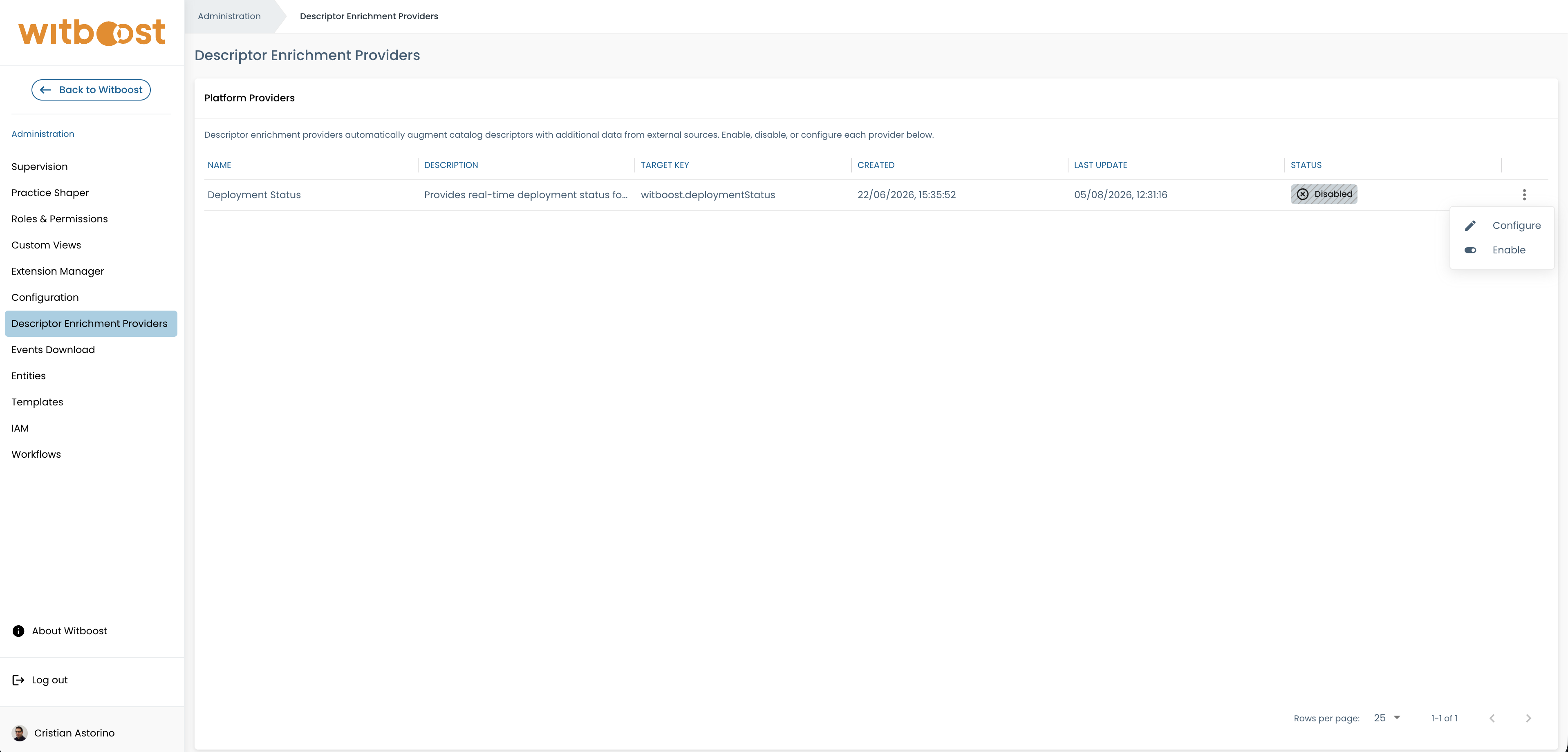
The panel displays all registered providers and their current status.
Enable a provider
Descriptor Enrichment Providers are registered automatically but are disabled by default. To activate one:
- Locate the provider in the registry.
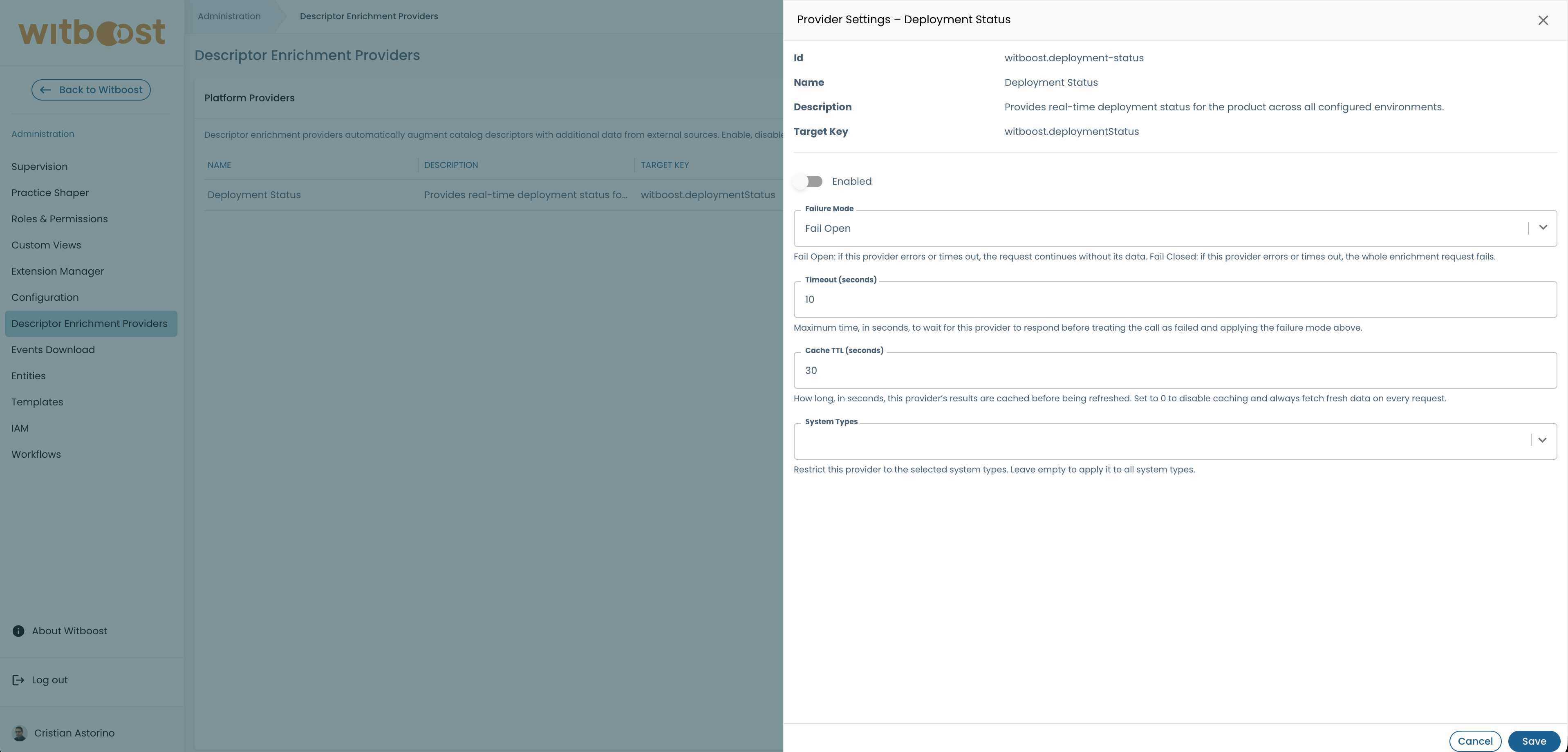
- Click Configure or the settings icon to open the Provider Settings drawer.
- Toggle the Enabled switch to on.
- Configure runtime settings (see Configuration options below).
- Save the configuration.
Changes take effect on the next evaluation. No platform restart is required.
Configuration options
Each provider exposes the following runtime settings. For detailed information about each parameter, see the configuration reference.
| Setting | Recommended Initial Value | Notes |
|---|---|---|
| Enabled | true | Whether the provider is active |
| Failure Mode | Fail Open | Start with Fail Open for safety; switch to Fail Closed after validation |
| Timeout (seconds) | Provider default | Adjust based on upstream service response time |
| Cache TTL (seconds) | Provider default | Lower for frequently changing data, higher to reduce load |
| System Types | Empty (all types) | Optionally restrict to specific project types |
Initial configuration recommendations
When enabling a provider for the first time:
-
Use Fail Open mode — This prevents blocking provisioning if the provider has issues. Monitor logs for warnings, then switch to Fail Closed once stable.
-
Start with default timeouts and TTL — Adjust after observing actual performance in your environment.
-
Test in non-production first — Enable in a lower environment, verify the enriched descriptor, then promote to production.
-
Consider system type filtering — If only certain project types need the descriptor enriched, use System Types to limit provider invocation and reduce unnecessary overhead.
Verify the provider is working
After enabling a provider:
- Trigger a test deployment or policy evaluation in the Builder.
- Check the governance evaluation result to confirm descriptor is enriched.
- Monitor platform logs for any provider warnings or errors.
- If using Fail Open mode, watch for "skipped provider" warnings that indicate connectivity or timeout issues.
Next steps
- For production rollout: Follow the rollout guide to safely enable providers in production
- To understand configuration parameters: See the configuration reference
- To see what providers are available: Check available providers